This week I wanted to explore more alternative ways of approach a new code base; be it Perl or any other programming language.
Online tools
If you are using a tool like GitHub, you have some tools at your disposal already. In the earlier posts, the screen shots of code I shared were from GitHub, I just zoomed out in the browser. I find the Contributors info in "Insights" really useful. You can see who wrote much of the code, then look at the commits to get a feel for where the churn is.
As a Perl person, you might like to take a look at Kritika.io as an example of the value of good tools. It unlike many has strong Perl support, such as Perl::Critic (more on that shortly), along with giving school style "grades" on specific files (A, B , B-, etc). It also tells you about churn, complexity and lines of code.
One of the interesting parts of Kritika (and similar tools) is the diagrammatic depictions of your code base, such as this one:

This gives a perspective on change "frequency over X time", in this case you can see the larger files have changed more frequently and the darker ones are more recently changed. This can give some insights into areas that are frequently changed (often problem areas) and so forth. A large frequently changed file for example might be one to consider breaking up.
Local tools
Kritika, is an interesting tool that prings us to Perl::Critic a staple of Perl development and a really great tool that is undervalued sometimes. It's incredibly extensible, so can do far more than what it does "out of the box". I'd strongly recommend running it on any new code base to help identify known "code smells".
Along with identifying code smells, it's very good at giving you some statistics on your code base, via the --statistics command, for example:
$ carton exec 'perlcritic --statistics-only lib'
   19 files.
   33 subroutines/methods.
1,153 statements.

1,670 lines, consisting of:
      316 blank lines.
        3 comment lines.
        0 data lines.
    1,351 lines of Perl code.
        0 lines of POD.

Average McCabe score of subroutines was 2.33.

2 violations.
Violations per file was 0.105.
Violations per statement was 0.002.
Violations per line of code was 0.001.

2 severity 4 violations.

2 violations of Subroutines::RequireFinalReturn.
So in this (not terrible) example; we can see that the complexity score of subroutines is 2.33, we have some statistics there about violations per file, statements and lines of code.
We also can make some measures of subroutines to files rations etc.
Another interesting way of looking at your new code base is gource
In the video above, you can see how developers have worked on the code base and see hot-spots and trends.
Another interesting tool, that may help with a legacy Perl code base is Code::Statistics. Once installed, you can run with codestat collect which will collect statistics on your code base. After which you run codestat report which will give you something like this:
================================================================================
                                  RootDocument
================================================================================

averages
ccomp: 19.5462060820785
lines: 438.453793917921
sdepth: 0
size: 12888.2081488043


                                     ccomp
top ten
Path                                  Line Col Ccomp Lines Sdepth Size    Dev.
--------------------------------------------------------------------------------
/SQL/Translator/Parser/DB2/Grammar.pm    1   1  6419 47955      0 2484388 328.40
ocal/lib/perl5/Perl/Tidy/Formatter.pm    1   1  3389 20274      0  782689 173.38
ocal/lib/perl5/Perl/Tidy/Tokenizer.pm    1   1  1193  8885      0  322357  61.03
/local/lib/perl5/Module/Build/Base.pm    1   1  1108  5568      0  161767  56.69
vwjl/local/lib/perl5/IO/Socket/SSL.pm    1   1   984  3509      0  109767  50.34
ib/perl5/Perl/Tidy/VerticalAligner.pm    1   1   681  4892      0  183931  34.84
l/local/lib/perl5/Parse/RecDescent.pm    1   1   592  6610      0  221223  30.29
cal/lib/perl5/DBIx/Class/ResultSet.pm    1   1   587  4824      0  143831  30.03
dev/vwjl/local/lib/perl5/Perl/Tidy.pm    1   1   572  4140      0  156109  29.26
ancew/dev/vwjl/local/lib/perl5/MCE.pm    1   1   562  2106      0   67048  28.75
--------------------------------------------------------------------------------

bottom ten
Path                                  Line Col Ccomp Lines Sdepth Size    Dev.
--------------------------------------------------------------------------------
e/lancew/dev/vwjl/lib/VWJL/Contest.pm    1   1     1    15      0     151   0.05
w/dev/vwjl/lib/VWJL/Infrastructure.pm    1   1     1    12      0     252   0.05
WJL/Infrastructure/DatabaseResults.pm    1   1     1    29      0     541   0.05
home/lancew/dev/vwjl/lib/VWJL/Waza.pm    1   1     1    27      0     251   0.05
/lancew/dev/vwjl/lib/vwjl_redirect.pm    1   1     1     8      0      99   0.05
ome/lancew/dev/vwjl/local/bin/plackup    1   1     1   236      0    7444   0.05
cal/lib/perl5/App/Cmd/ArgProcessor.pm    1   1     1    51      0     934   0.05
/lib/perl5/App/Cmd/Command/version.pm    1   1     1    68      0    1255   0.05
wjl/local/lib/perl5/App/Cmd/Plugin.pm    1   1     1    43      0     688   0.05
hare/dist/Dancer2/skel/lib/AppFile.pm    1   1     1    10      0     151   0.05
--------------------------------------------------------------------------------
And much much more.
Run the tests!
This is probably one of the key approaches, run the tests. Understand the tests.
Then write more tests.
No tech solution
Draw it; never underestimate the power of drawing a diagram that shows the connections between classes.
Start with whatever you find easiest (say the homepage if a web app), and work through all the connections. Mapping out perhaps what the data provide to the template is, what does that connect to? What methods are called? What data is passed around.
This might help you identify the code that is "business logic", what is "infrastructure" etc. Where are the linkages? What files have too much code in them? Is there a clear flow to the code?
Visualising it can be super powerful, even if like me you are not particularly artistic.
This is another one of those posts about the Perl Weekly Challenge where I briefly describe the solution I write for the challenge. You can see other posts in this series clicking HERE.
This week the challenge was to implement the classic Caesar cipher.
Here is the week 097 challenge:
TASK #1 › Caesar Cipher
Submitted by: Mohammad S Anwar
You are given string $S containing alphabets A..Z only and a number $N.
Write a script to encrypt the given string $S using Caesar Cipher with left shift of size $N.
Example
Input: $S = "THE QUICK BROWN FOX JUMPS OVER THE LAZY DOG", $N = 3
Output: "QEB NRFZH YOLTK CLU GRJMP LSBO QEB IXWV ALD"
Plain: ABCDEFGHIJKLMNOPQRSTUVWXYZ
Cipher: XYZABCDEFGHIJKLMNOPQRSTUVW
Plaintext: THE QUICK BROWN FOX JUMPS OVER THE LAZY DOG
Ciphertext: QEB NRFZH YOLTK CLU GRJMP LSBO QEB IXWV ALD
As is my habit I started by creating a .t test file:
use strict;
use warnings;

use Test2::V0 -target => 'Caesar';

can_ok( $CLASS, 'encode' );

done_testing;
This is for me an example of "[tracer bullet developmentp(https://growsmethod.com/practices/TracerBullets.html)", to a degree at least.
The idea, which I think I first saw in the Pragmatic Programmer book, is that you should try going end to end with the thinnest slice you can.
So in this case the bare minimum I am looking for is a class that has a encode method. That's my base, so this test is simply trying to load a package and checking the method exists.
At this point it fails as lib/Caesar.pm does not exist; so I create a simple file:
package Caesar;

use Moo;

1;
This also fails as there is no encode method; so I add that:
package Caesar;

use Moo;

sub encode {}

1;
And now my tests pass, as I have a module with the correct file and package names, and a correctly named method. This may seem to simple to bother as a first step, but given how terrible my typing is, I like to confirm the basics. In a "real" code base where you might be building a feature that requires multiple new classes and/or methods at varying layers I think it's really valuable to at least "wire up" the classes and methods this way before starting to add business logic. It just helps avoid the inevitable typo style errors. I think it also helps me with naming as you flex your fingers through multiple places; it becomes obvious where a naming convention is jarring. It's loads easier to make the naming changes before anything relies on it.
So... having established as frame to work from (some people call this a walking skeleton, I can start fleshing it out, so lets add a more useful test:
use strict;
use warnings;

use Test2::V0 -target => 'Caesar';

subtest '->encode()' => sub {
    my $S        = 'THE QUICK BROWN FOX JUMPS OVER THE LAZY DOG';
    my $N        = 3;
    my $expected = "QEB NRFZH YOLTK CLU GRJMP LSBO QEB IXWV ALD";

    my $got = $CLASS->encode(
        string => $S,
        n      => $N,
    );

    is $got, $expected, "'$S' with shift of '$N' should return '$expected'";
};


done_testing;
So we can see easily there what we are feeding in and what we expect out, and Test2::V0 makes it really easy to visualise what we are testing. The code that generates starts as simple as return 'QEB NRFZH YOLTK CLU GRJMP LSBO QEB IXWV ALD' as the first iteration. Then grows outwards, and in my case I ended up with:
sub encode {
    my ( $self, %args ) = @_;

    my $cipher = $self->_cipher( 'n' => $args{n}, mode => 'encode' );

    my $text;
    my @chars = split "", $args{string};
    for my $char (@chars) {
        $text .= $cipher->{ lc($char) };

    }

    return uc $text;
}
To be clear, this is the version after several iterations. You can see I call a "private" method $self->_cipher which was code that was originally in the method, but I moved it out when I added the ability to both encode and decode text. The code is hopefully pretty understandable, we get the cipher. We take the string we were passed and convert it into an array. Then is a simple loop through the array converting the encoded character to the decoded character. Finally returning the converted string.
You'll see I added a lc (lower case) and a uc (upper case) to format as per the examples.
The $cipher is a simple hash that has a nice encoded => decoded mapping. It's generated with this code:
sub _cipher {
    my ( $self, %args ) = @_;

    my @alpha  = (qw/a b c d e f g h i j k l m n o p q r s t u v w x y z/);
    my @cipher = @alpha;

    if ( $args{mode} eq 'decode' ) {

        for ( 1 .. $args{n} ) {
            my $char = pop @cipher;
            unshift @cipher, $char;
        }
    }
    else {
        for ( 1 .. $args{n} ) {
            my $char = shift @cipher;
            push @cipher, $char;
        }

    }

    my %code;
    for my $i ( 0 .. 25 ) {
        $code{ $cipher[$i] } = $alpha[$i];
    }

    $code{' '} = ' ';

    return \%code;
}
You'll notice that again this is the "final" version, not the basic code that existed in the iterations. That should be obvious from the if statement in the middle there that gives me the structure for a decode OR a encode operation. Which is a feature I added later in the process. Being in a separate method, it had the advantage that I could test it in isolation; which was helpful when I miscoded the solution to decode originally.
In a break from the norm for me; this time I actually made this work from/as a script. So here is my ch-1.pl file:
use strict;
use warnings;

use lib './lib';
use Caesar;

use Getopt::Long;

my ($string,$n,$decode);
GetOptions(
    'string=s' => \$string,
    'n=i'      => \$n,
    'd'        => \$decode,
);

unless ($string && $n) {
    die <<"MESSAGE";

MISSING PARAMS

You need to provide:
 -s "the string to encode goes here"
 -n 3


eg perl ch-1.pl -s "foo bar" -n 3

Which rotates "foo bar" by three characters, returning:
CLL YXO

By default the script will encode, add the -d param to decode.


MESSAGE
}


my $caesar = Caesar->new;

my $text;
if ($decode) {
    $text = $caesar->decode(
        string => $string,
        n      => $n,
    );
} else {
    $text = $caesar->encode(
        string => $string,
        n      => $n,
    );

}
print $text;
print "\n";
Now, just to protect my reputation, yes this is clunky and I am intentionally not coding defensively. I have zero parameter checking anywhere in the code. I do this for fun after all, and consciously choose to not do it "right".
OK with that caveat in place... I did start by just using @ARGV, but wanted to remind myself about how Getopt::Long feels. So using that to manage the inputs, which includes my -d switch. -d is the decode option (Do I get extra credit Mohammad?) so that you can encode and decode messages with this script. I have the module installed, so this is definitely a "Works on my machine" solution.
The last version of the module looks like this:
 t/00-cipher.t  l/Caesar.pm  ch-1.pl                                                                                                                                                         X
package Caesar;

use Moo;

sub encode {
    my ( $self, %args ) = @_;

    my $cipher = $self->_cipher( 'n' => $args{n}, mode => 'encode' );

    my $text;
    my @chars = split "", $args{string};
    for my $char (@chars) {
        $text .= $cipher->{ lc($char) };

    }

    return uc $text;

}

sub decode {
    my ( $self, %args ) = @_;

    my $cipher = $self->_cipher( 'n' => $args{n}, mode => 'decode' );

    my $text;
    my @chars = split "", $args{string};
    for my $char (@chars) {
        $text .= $cipher->{ lc($char) };

    }

    return uc $text;
}

1;

sub _cipher {
    my ( $self, %args ) = @_;

    my @alpha  = (qw/a b c d e f g h i j k l m n o p q r s t u v w x y z/);
    my @cipher = @alpha;

    if ( $args{mode} eq 'decode' ) {

        for ( 1 .. $args{n} ) {
            my $char = pop @cipher;
            unshift @cipher, $char;
        }
    }
    else {
        for ( 1 .. $args{n} ) {
            my $char = shift @cipher;
            push @cipher, $char;
        }

    }

    my %code;
    for my $i ( 0 .. 25 ) {
        $code{ $cipher[$i] } = $alpha[$i];
    }

    $code{' '} = ' ';

    return \%code;
}
And the test file ended up looking like this:
use strict;
use warnings;

use Test2::V0 -target => 'Caesar';

can_ok( $CLASS, 'decode' );

subtest '->encode()' => sub {
    my $S        = 'THE QUICK BROWN FOX JUMPS OVER THE LAZY DOG';
    my $N        = 3;
    my $expected = "QEB NRFZH YOLTK CLU GRJMP LSBO QEB IXWV ALD";

    my $got = $CLASS->encode(
        string => $S,
        n      => $N,
    );

    is $got, $expected, "'$S' with shift of '$N' should return '$expected'";
};

subtest '->decode()' => sub {
    my $expected = 'THE QUICK BROWN FOX JUMPS OVER THE LAZY DOG';
    my $N        = 3;
    my $S        = "QEB NRFZH YOLTK CLU GRJMP LSBO QEB IXWV ALD";

    my $got = $CLASS->decode(
        string => $S,
        n      => $N,
    );

    is $got, $expected, "'$S' with shift of '$N' should return '$expected'";
};

subtest '->_cipher(mode => "encode")' => sub {
    my $expected = {
        ' ' => ' ',
        'a' => 'x',
        'b' => 'y',
        'c' => 'z',
        'd' => 'a',
        'e' => 'b',
        'f' => 'c',
        'g' => 'd',
        'h' => 'e',
        'i' => 'f',
        'j' => 'g',
        'k' => 'h',
        'l' => 'i',
        'm' => 'j',
        'n' => 'k',
        'o' => 'l',
        'p' => 'm',
        'q' => 'n',
        'r' => 'o',
        's' => 'p',
        't' => 'q',
        'u' => 'r',
        'v' => 's',
        'w' => 't',
        'x' => 'u',
        'y' => 'v',
        'z' => 'w',
    };

    my $got = $CLASS->_cipher(
        'n'  => 3,
        mode => 'encode'
    );

    is $got, $expected, 'encode mode (shift 3) cipher as expected';

    $expected = {
        ' ' => ' ',
        'a' => 'v',
        'b' => 'w',
        'c' => 'x',
        'd' => 'y',
        'e' => 'z',
        'f' => 'a',
        'g' => 'b',
        'h' => 'c',
        'i' => 'd',
        'j' => 'e',
        'k' => 'f',
        'l' => 'g',
        'm' => 'h',
        'n' => 'i',
        'o' => 'j',
        'p' => 'k',
        'q' => 'l',
        'r' => 'm',
        's' => 'n',
        't' => 'o',
        'u' => 'p',
        'v' => 'q',
        'w' => 'r',
        'x' => 's',
        'y' => 't',
        'z' => 'u',
    };

    $got = $CLASS->_cipher(
        'n'  => 5,
        mode => 'encode'
    );
    is $got, $expected, 'encode mode (shift 5) cipher as expected';

};

subtest '->_cipher(mode => "decode")' => sub {
    my $expected = {
          ' ' => ' ',
          'a' => 'd',
          'b' => 'e',
          'c' => 'f',
          'd' => 'g',
          'e' => 'h',
          'f' => 'i',
          'g' => 'j',
          'h' => 'k',
          'i' => 'l',
          'j' => 'm',
          'k' => 'n',
          'l' => 'o',
          'm' => 'p',
          'n' => 'q',
          'o' => 'r',
          'p' => 's',
          'q' => 't',
          'r' => 'u',
          's' => 'v',
          't' => 'w',
          'u' => 'x',
          'v' => 'y',
          'w' => 'z',
          'x' => 'a',
          'y' => 'b',
          'z' => 'c',
    };

    my $got = $CLASS->_cipher(
        'n'  => 3,
        mode => 'decode'
    );

    is $got, $expected, 'decode mode (shift 3) cipher as expected';

    $expected = {
          ' ' => ' ',
          'a' => 'f',
          'b' => 'g',
          'c' => 'h',
          'd' => 'i',
          'e' => 'j',
          'f' => 'k',
          'g' => 'l',
          'h' => 'm',
          'i' => 'n',
          'j' => 'o',
          'k' => 'p',
          'l' => 'q',
          'm' => 'r',
          'n' => 's',
          'o' => 't',
          'p' => 'u',
          'q' => 'v',
          'r' => 'w',
          's' => 'x',
          't' => 'y',
          'u' => 'z',
          'v' => 'a',
          'w' => 'b',
          'x' => 'c',
          'y' => 'd',
          'z' => 'e',
    };

    $got = $CLASS->_cipher(
        'n'  => 5,
        mode => 'decode'
    );

    is $got, $expected, 'decode mode (shift 5) cipher as expected';

};

done_testing;
I hope if you are reading this that you found it interesting. This is not a particularly sophisticated solution I know. I am sure some of my peers can do this as a one liner. That is not my style. I like simple. This has also only had limited attention applied and zero defensive programming or testing for edge cases. I did refactor a little as I went along, but not with much focus or time investment.
I'd be interested in your approaches and your comments, drop me a message to lance@perl.kiwi or tweet me @perlkiwi.
This is part three of an exploration of some ideas around how I approach picking up a legacy Perl codebase.
In part one I wrote about starting with tests and using carton to manage the module dependencies. In part two we covered Perl::Critic and looking at the code from that 30,000 view.
In this post; I'll show some of the refactorings that came from the 30,000 view.
So if you look at the code, you can see lots of repetition, which we can simplify.
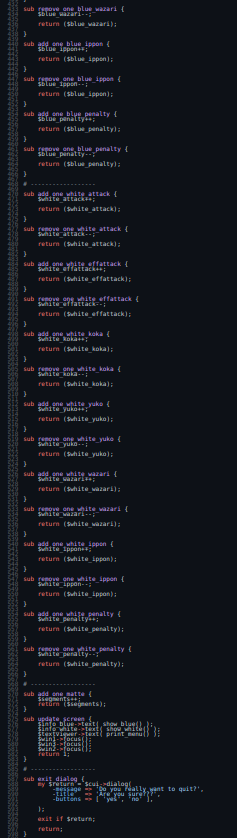
There are many repetitions that look like this:
sub add_one_white_penalty {
    $white_penalty++;
    return ($white_penalty);
}
sub remove_one_white_penalty {
    $white_penalty--;
    return ($white_penalty);
}
So what we can do is create a single sub that accepts some parameters and update the counters, so something like this:
sub update {
    my (%args) = @_;

    if ( $args{'mode'} eq 'inc' ) {
        $counters{ $args{'colour'} }{ $args{'statistic'} }++;
    }
    else {
        $counters{ $args{'colour'} }{ $args{'statistic'} }--;
    }
}
So this single function can replace all those repetitions (we did also need to created hash to hold the data, rather than the many scalars.
The other large bit of repetition is the binding of keys to the update function, which before refactoring looks like this:
    $cui->set_binding( sub { add_one_blue_attack(); update_screen(); }, 'f' );
    $cui->set_binding( sub { remove_one_blue_attack(); update_screen(); }, 'F' );

    $cui->set_binding( sub { add_one_blue_effattack(); update_screen(); }, 'd' );
    $cui->set_binding( sub { remove_one_blue_effattack(); update_screen(); }, 'D' );
So we can reduce the repetition like this:
    my @keys = (
        [ 'blue', 'attack',    'inc', 'f' ],
        [ 'blue', 'attack',    'dec', 'F' ],
        [ 'blue', 'effattack', 'inc', 'd' ],
        [ 'blue', 'effattack', 'dec', 'D' ],
        [ 'blue', 'koka',      'inc', 'v' ],
        [ 'blue', 'koka',      'dec', 'V' ],
        [ 'blue', 'yuko',      'inc', 'c' ],
        [ 'blue', 'yuko',      'dec', 'C' ],
        [ 'blue', 'wazari',    'inc', 'x' ],
        [ 'blue', 'wazari',    'dec', 'X' ],
        [ 'blue', 'ippon',     'inc', 'z' ],
        [ 'blue', 'ippon',     'dec', 'Z' ],
        [ 'blue', 'penalty',   'inc', 't' ],
        [ 'blue', 'penalty',   'dec', 'T' ],

        [ 'white', 'attack',    'inc', 'j' ],
        [ 'white', 'attack',    'dec', 'J' ],
        [ 'white', 'effattack', 'inc', 'k' ],
        [ 'white', 'effattack', 'dec', 'K' ],
        [ 'white', 'koka',      'inc', 'n' ],
        [ 'white', 'koka',      'dec', 'N' ],
        [ 'white', 'yuko',      'inc', 'm' ],
        [ 'white', 'yuko',      'dec', 'M' ],
        [ 'white', 'wazari',    'inc', ',' ],
        [ 'white', 'wazari',    'dec', '<' ],
        [ 'white', 'ippon',     'inc', '.' ],
        [ 'white', 'ippon',     'dec', '>' ],
        [ 'white', 'penalty',   'inc', 'u' ],
        [ 'white', 'penalty',   'dec', 'U' ],

    );

    for my $k (@keys) {
        $cui->set_binding(
            sub {
                update(
                    colour    => $k->[0],
                    statistic => $k->[1],
                    mode      => $k->[2],
                    ),
                    update_screen();
            },
            $k->[3]
        );
    }
This drops the line count from 440 down to 334 lines, smaller is better. Less code is less places for bugs to hide. The code is technically a little more complex, but simpler in that we are not repeating ourselves as much. So we can reduce the chances of introducing bugs.
When we zoom out on the code now, there code has a very different shape to it, the repetitive subs are no longer there. This helps highlight the next level of complexity, the display code... and that's what we will tackle next time.
This is part two of an exploration of some ideas around how I approach picking up a legacy Perl code base.
In part one I wrote about starting with tests and using carton to manage the module dependencies.
In this post; we will take a look at the code base itself and some ideas on how to quickly identity areas to improve.
Perl::Critic
Perl is a mature language, with mature tooling. One of the "hidden gems" of Perl is Perl::Critic, which is a static analysis tool that gives great insights into the code. One really powerful aspect is that we have a book to reference; "Perl Best Practices" and Perl::Critic can help us follow this guidance and will reference exact parts of the book. It's extensible and there are plenty of opinionated Perl developers who have shared their policies.
So lets run it and see what happens, after first adding Perl::Critic to the cpanfile.
$ carton exec perlcritic -5 Notator.pl
Notator.pl source OK
So at the least strict level, the file is OK. This is a good sign; nothing terrible wrong. So lets try another level of strictness:
$ carton exec perlcritic -4 Notator.pl
Magic variable "$OUTPUT_AUTOFLUSH" should be assigned as "local" at line 12, column 19.  See pages 81,82 of PBP.  (Severity: 4)
Subroutine "new" called using indirect syntax at line 87, column 12.  See page 349 of PBP.  (Severity: 4)
Subroutine "new" called using indirect syntax at line 355, column 20.  See page 349 of PBP.  (Severity: 4)
This time we get three lines, you can see the references to pages in the Perl Best Practices (PBP) pages that relate. There are also references to the lines in the file itself. So the last two lines are the same and are pretty easy fixes; so lets go fix those.
$cui = new Curses::UI( -color_support => 1 );
We can rewrite this as:
$cui = Curses::UI->new( -color_support => 1 );
That warning about the Magic variable is pretty self explanatory, so we can pop local at the start of the line as suggested.
If we re-run perlcritic we are now all clear again.
But if we look at the $cui = new Curses::UI( -color_support => 1 ); line, you'll notice that there is no my; which if we look about the file a bit gives us a clue... this file is all global variables which is generally a bad thing. Looking further the variables are at least tidy and sensible, but there are a lot of scalar variables which is not ideal. A to be fair to the 2007 author (which yes was me), they did leave a large comment to make it clear the variables are global.
my $run_flag = 1;
my $segments = 0;
my $active = 0;
my $events = 0;
my $blue_attack = 0;
my $blue_effattack = 0;
my $blue_koka = 0;
my $blue_yuko = 0;
my $blue_wazari = 0;
my $blue_ippon = 0;
my $blue_penalty = 0;
my $white_attack = 0;
my $white_effattack = 0;
my $white_koka = 0;
my $white_yuko = 0;
my $white_wazari = 0;
my $white_ippon = 0;
my $white_penalty = 0;
my $cui;
my $win1;
my $win2;
my $win3;
my $info_blue;
my $info_white;
my $textviewer;
Readonly my $BASEYEAR => 1900;
We can look at perhaps creating a hash so we decrease the variables... but that is minor. We could look at scoping the variables and so forth too. That use of Readonly we could alter too, does it really need to be readonly? Could we use constant instead?
But first lets look more broadly.
Getting the big picture
A tip for looking at a new code base is to literally scroll out and look at the shape of the code. This is an old hackers trick, but somewhere I have read research where teaching developers about code smells by looking at files at this zoom level was proven to be effective (as effective) as teaching the underlying principles.
So lets take a look:

And...

What is leaping out to me lots of repetition, and the more code we write, the more bugs we introduce. So that looks like a really good place to invest some time and energy. So lets see what we can do there.
Looking at the second pic those look like a series of subroutines that have near identical structures, here are a few of them:
sub remove_one_white_effattack {
    $white_effattack--;

    return ($white_effattack);

}

sub add_one_white_koka {
    $white_koka++;

    return ($white_koka);

}

sub remove_one_white_koka {
    $white_koka--;

    return ($white_koka);

}
So yes they are all really similar; basically just altering those global variables; and looking at the other block of repetition we see:
    $cui->set_binding( sub { add_one_white_effattack(); update_screen(); },
        'k' );
    $cui->set_binding( sub { remove_one_white_effattack(); update_screen(); },
        'K' );

    $cui->set_binding( sub { add_one_white_koka(); update_screen(); }, 'n' );
    $cui->set_binding( sub { remove_one_white_koka(); update_screen(); },
        'N' );
So this gives us some ideas on where we can focus our attentions, and that shall be the topic of the next post in this series.
Today I want to cover a little about how I go about resurrecting an old Perl code base. In this example I am working with an old ncurses application I wrote in 2009 as part of a Judo research project I was involved in at the time.
The following steps are perhaps of interest to anyone picking up a similar project from long ago... or adopting a new code base.
So I shall be looking at my Judo-Notator project.
Start with the tests.
If you are lucky, there should be a t directory in any perl project you pick up. Perl has a strong test culture, one of the really valuable parts of Perl is CPANTS. CPANTS is a free service that tests every Perl module in the CPAN. So you can expect with relatively high likelihood some tests in most Perl projects.
Within the Judo-Notator code base, there was a t directory holding three files:
- notator.t
- use_strict.t
- use_warnings.t
Interestingly, those second two files are just testing if all the Perl files in the project are using use strict and use warnings. That's "best practice", maybe I'd caught myself being lazy and wrote tests to stop me not adding those two pragma... but not really useful.
notator.t is more interesting, at only 41 lines it's clearly not comprehensive; but a quick look gave some clues to the code base structure.
At this point I tried the tests.
Unfortunately none of the tests work as there are some missing modules, specifically Test::Output and File::Find::Rule so now is a good time to start handling the module dependencies via Carton and a cpanfile. This code base does not have one; so I added one with the following:
requires "File::Find::Rule" => "0.34";
requires "Test::Output" => "1.031";
The cpanfile is used via the carton command line tool, which will read this file and install the modules in a local directory. So lets run carton install and then see what happens when we run the tests. This time we need to run prove with carton carton exec prove -l t.
This failed hard! Lots of errors; why? Because using carton created that local directory, and there are lots of perl modules in there that apparently don't use strict so at this point I needed to alter the test to only look in the root directory and not the children... or scrap them.
This is a tough call, it seems like a useless test... but the original author (which is younger me) might have written that test for a good reason. So I am choosing to make the test work, just in case. When working with a legacy code base; I think we need to assume if a test was written it was probably written for a good reason. So till know the code base we need to be careful about assuming something is not needed.
So after making the File::Find::Rule module stay in the first directory this is what the tests show us (you'll need to scroll right, my layout is too narrow and no word wrap...sorry):
$ carton exec "prove -lv t"
t/notator.t ....... Can't locate notator.pl in @INC (@INC contains: /home/lancew/dev/judo-notator/lib /home/lancew/dev/judo-notator/local/lib/perl5/5.31.11/aarch64-linux /home/lancew/dev/judo-notator/local/lib/perl5/5.31.11 /home/lancew/dev/judo-notator/local/lib/perl5/aarch64-linux /home/lancew/dev/judo-notator/local/lib/perl5 /home/lancew/perl5/perlbrew/perls/perl-5.31.11/lib/site_perl/5.31.11/aarch64-linux /home/lancew/perl5/perlbrew/perls/perl-5.31.11/lib/site_perl/5.31.11 /home/lancew/perl5/perlbrew/perls/perl-5.31.11/lib/5.31.11/aarch64-linux /home/lancew/perl5/perlbrew/perls/perl-5.31.11/lib/5.31.11) at t/notator.t line 9.

1..0
skipped: (no reason given)
t/use_strict.t ....
ok 1 - notator.pl uses strict
ok 2 - Notator.pl uses strict
ok 3 - smoketest.pl uses strict
ok 4 - guitest.pl uses strict
1..4
ok
t/use_warnings.t ..
ok 1 - notator.pl uses warnings
ok 2 - Notator.pl uses warnings
ok 3 - smoketest.pl uses warnings
ok 4 - guitest.pl uses warnings
1..4
ok

Test Summary Report
-------------------
t/notator.t     (Wstat: 512 Tests: 0 Failed: 0)
  Non-zero exit status: 2
Files=3, Tests=8,  1 wallclock secs ( 0.06 usr  0.01 sys +  0.46 cusr  0.05 csys =  0.58 CPU)
Result: FAIL
So 2/3 of the test files are working; so lets look at that last one. The test output is saying Can't locate notator.pl so lets look at the test file and see how it is structored:
#!/usr/bin/perl
use strict;
use warnings;
use Test::More qw(no_plan);
use Test::Output;
require 'notator.pl';
is( Local::Notator::dumb_test(), 'yes', 'dumb_test is OK');
like( Local::Notator::print_menu(), qr/ENTER = MATTE/, 'print_menu is OK' );
is( Local::Notator::reset_counters(), 1, 'reset_counters is OK');
like( Local::Notator::print_results(), qr/Segments/, 'print_results is OK' );
like( Local::Notator::show_blue(), qr/Penalty: 0/, 'show_blue is OK' );
like( Local::Notator::show_white(), qr/Penalty: 0/, 'show_white is OK' );
is( Local::Notator::add_one_blue_attack(), 1, 'add_one_blue_attack is OK');
is( Local::Notator::add_one_blue_effattack(), 1, 'add_one_blue_effattack is OK');
is( Local::Notator::add_one_blue_koka(), 1, 'add_one_blue_koka is OK');
is( Local::Notator::add_one_blue_yuko(), 1, 'add_one_blue_yuko is OK');
is( Local::Notator::add_one_blue_wazari(), 1, 'add_one_blue_wazari is OK');
is( Local::Notator::add_one_blue_ippon(), 1, 'add_one_blue_ippon is OK');
is( Local::Notator::add_one_white_attack(), 1, 'add_one_white_attack is OK');
is( Local::Notator::add_one_white_effattack(), 1, 'add_one_white_effattack is OK');
is( Local::Notator::add_one_white_koka(), 1, 'add_one_white_koka is OK');
is( Local::Notator::add_one_white_yuko(), 1, 'add_one_white_yuko is OK');
is( Local::Notator::add_one_white_wazari(), 1, 'add_one_white_wazari is OK');
is( Local::Notator::add_one_white_ippon(), 1, 'add_one_white_ippon is OK');
is( Local::Notator::add_one_matte(), 2, 'add_one_matte is OK');
like( Local::Notator::results(), qr/Penalty:/, 'results is OK' );
Line 9 is where the error occurs, it's a simple line:
require 'notator.pl';
This looks like a simple fix:
require './notator.pl';
This gives us this:
$carton exec "prove -lv t/notator.t"

t/notator.t .. Can't locate Curses/UI.pm in @INC (you may need to install the Curses::UI module) (@INC contains: /home/lancew/dev/judo-notator/lib /home/lancew/dev/judo-notator/local/lib/perl5/5.31.11/aarch64-linux /home/lancew/dev/judo-notator/local/lib/perl5/5.31.11 /home/lancew/dev/judo-notator/local/lib/perl5/aarch64-linux /home/lancew/dev/judo-notator/local/lib/perl5 /home/lancew/perl5/perlbrew/perls/perl-5.31.11/lib/site_perl/5.31.11/aarch64-linux /home/lancew/perl5/perlbrew/perls/perl-5.31.11/lib/site_perl/5.31.11 /home/lancew/perl5/perlbrew/perls/perl-5.31.11/lib/5.31.11/aarch64-linux /home/lancew/perl5/perlbrew/perls/perl-5.31.11/lib/5.31.11) at ./notator.pl line 8.
BEGIN failed--compilation aborted at ./notator.pl line 8.
Compilation failed in require at t/notator.t line 9.

1..0
skipped: (no reason given)

Test Summary Report
-------------------
t/notator.t (Wstat: 512 Tests: 0 Failed: 0)
  Non-zero exit status: 2
Files=1, Tests=0,  0 wallclock secs ( 0.05 usr  0.01 sys +  0.16 cusr  0.01 csys =  0.23 CPU)
Result: FAIL
So we are missing another module, so time to update the cpanfile, run carton install and re-run the tests:
requires "File::Find::Rule" => "0.34";
requires "Test::Output" => "1.031";
requires "Curses::UI" => "0.9609";
requires "Readonly" => "2.05";
Which gives us this:
$ carton exec "prove -l t/"
t/notator.t ....... ok
t/use_strict.t .... ok
t/use_warnings.t .. ok
All tests successful.
Files=3, Tests=28,  1 wallclock secs ( 0.07 usr  0.00 sys +  0.67 cusr  0.05 csys =  0.79 CPU)
Result: PASS
At this stage I was able to try the notator.pl script via carton exec perl notator.pl... and it worked... at least it loads and the ncurses interface came up.
Perltidy time
It's really helpful to have a tidy code base before you dig deep into it. I also find that one big tidy is often justifiable. So I add the Perl::Tidy module to the cpanfile then run it against the Perl files. But before I do I want to add a .perltidyrc file to give me the default behavior I am used to:
--backup-and-modify-in-place
--backup-file-extension=/
--perl-best-practices
--nostandard-output
--no-blanks-before-comments
The useful ones here is that I modify the actual files; no .tdy files for me please.
The next step for me is a good read of the code; and determine what looks bad. I shall cover that in another post.